
Labora: Mirrors, camera's and security
This article is under development. It is about an alternative approach to mirrors and cameras for security and observation for a mobile environment - in this case, the office on wheels “Labora”. Of course we want more and more but it starts with a basic solution and from that point we build on. This will be an article about hardware such as cameras, monitors and computers on the one hand, and software such as ZoneMinder and Linux on the other. Some important notes:
- This article is for learning with plenty of starting points for moving forward.
- The technology discussed on this page is of course also applicable to ships, construction project security, residential buildings and so on.
- The emphasis is on low power consumption on the one hand and a cost-effective solution on the other.
- $ means as user and # means as root.
- Use the TOC to navigate.
Starting points
- Functionality:
- The system could have a dual function:
- Cameras can serve road safety. For example, a rear camera could be projected on a phone while driving.
- Functions as security cameras are required, at least as rotating streams.
- To what extent can functions overlap?
- The system could have a dual function:
- Financial:
- Not unlimited and keeping it reasonable, yes, this is subjective.
- Software:
- Debian Linux
- ZoneMinder
- Internet access: tethering over an android phone
- Power consumption
- Armed: Aiming at (considerable) smaller than 1kWh/24h
- If there is no shore power then there is always enough left in the batteries combined with a proper camera plan.
- A DeskMini with AMD 4650G consumes idling ~10 Watts plus very little overhead of an economical network switch (Edimax ES-5800G V3). Data traffic over IP causes hardly any increase.
- Coding/decoding streams will be a CPU burden. Just storing streams does not.
- Camera's
- The sum of the consumption of the cameras is difficult to estimate, per camera it is not much (~2.5W) but multiplied by the number of camera's it becomes considerable.
- For publication, support is crucial. I decided to do a post on the forum.
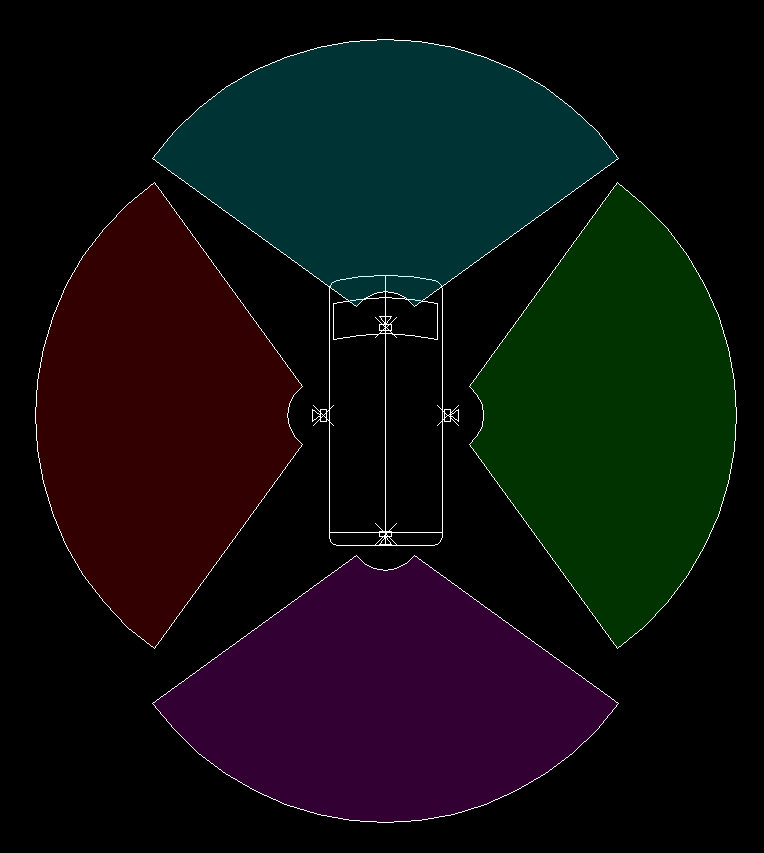
- Simplified camera positions:
Hardware
Let's start with a layout:
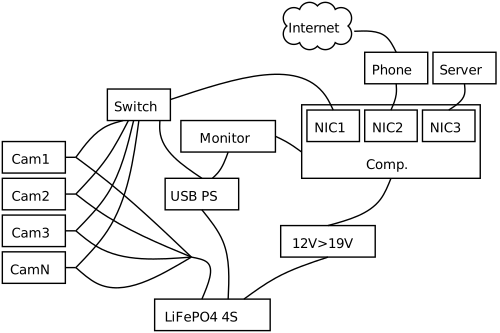
- Power supply: A 4S LiFePO4 battery (LFP) is used for power.
- Computer: An Asrock Deskmini runs on 19V, step up, booster converter of at least 140W.
- Switch and monitor accept USB power. Monitor requires DP power and thus a specific USB converter with sufficient power. Power for switch can also be drawn from computer.
- Cameras: IP with injected POE or USB, 12V, see Voltage tolerances manufacturer (such as +/-25%) and, if possible, connected directly to LFP.
About video camera's
Then there is a plethora of video camera's. I've decided to give it a separate page in order not to pollute this one. See this page.
Functionality
This discussion is not that difficult. On the one hand, the desire is for as few cameras as possible, and you can achieve that by giving cameras a dual function: security and real-time view of the environment. On the other hand, concessions are not really desirable.
An example says more. An IP-based security camera at the back of the van cannot properly have the function of a rear-view mirror at the same time. The reason is that the latency, the delay between reality and the image on a screen, can be so great that it compromises driving safety. With a USB camera, latency plays hardly any role. As a result, you may end up with two cameras at the back, unless the USB camera can also be well integrated within the security software.
Time will tell as this post matures.
Computer
Pharlap2 is dead, long live pharlap2! Yes, this machine gets a second live.
To sum up some hardware specs: Power supply mainly an LFP 12V step-up, booster, to 19V and alternatively 230V to 19 V. RAM 32 GB, NVME 2 TB extendable, CPU AMD 4650G.
Monitor
See
Many complications and question marks are to be expected. Call them challenges, if you want to approach it positively. A summary:
- Image settings:
- Very bright image in sunny weather and dark at night.
- OLED is obvious.
- Control of brightness and some camera control keys, possible with programmable keypad.
- Screen should have quick release for easy attachment and detachment (theft and space).
- Low power consumption.
- Cabling: signal DisplayPort > USB C? i.e. “DP Alt Mode” and separate cable for USB power? Do power injectors exist? Make your own?
- Monitors to consider - that are too big for rear-view mirror functionality:
Projections
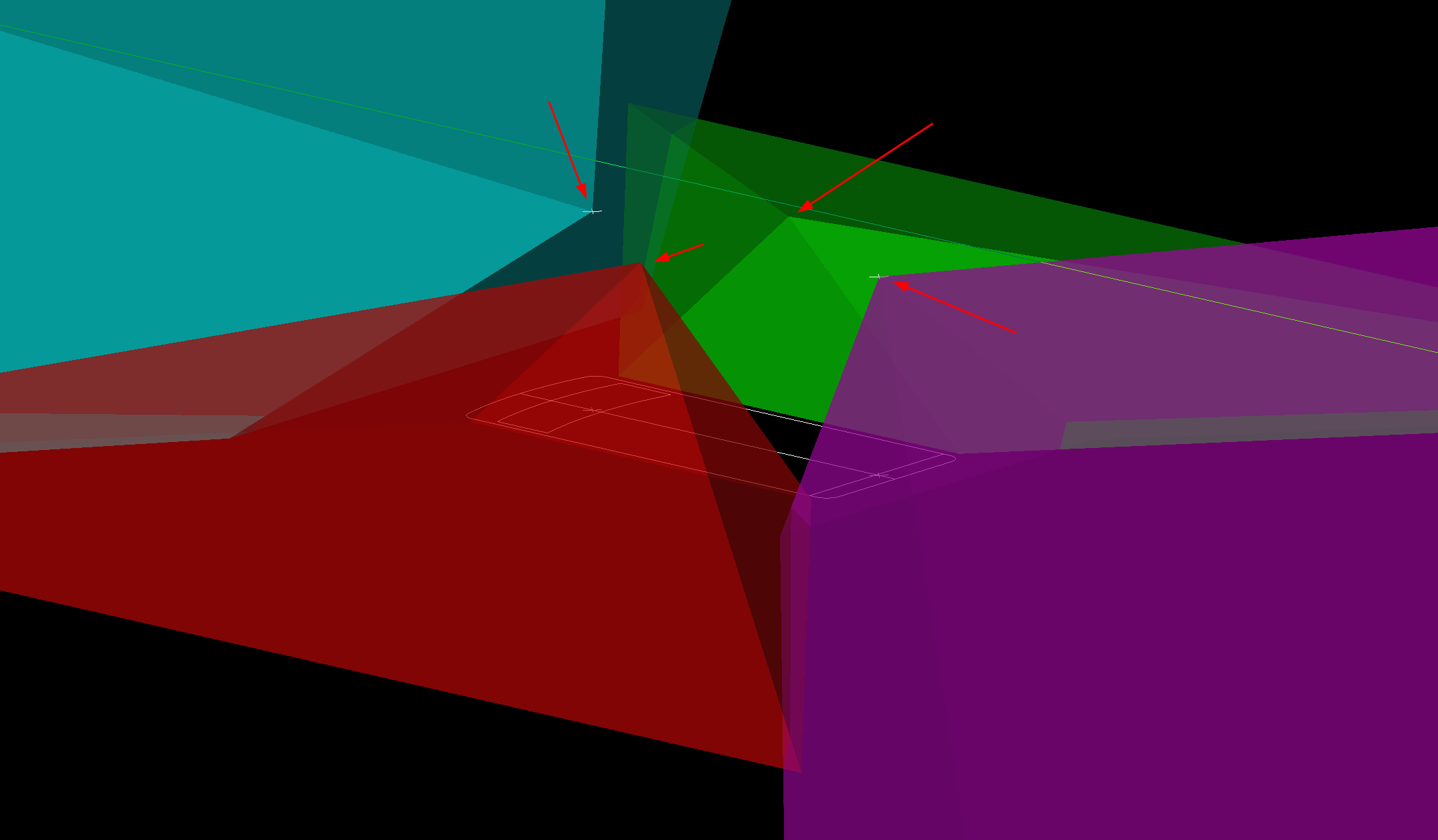
After retrieving FOV by measuring it is possible to model the view cones, projected on the road. It means that everything in a cone is visible on z=0 level.
Lens: 2.8 mm on test 1 camera. Height is ~2.5m. Measured FOV hor. 108 degrees (=3840px). Calculated FOV vert. 75 degrees (~2160px/3840px*108).
Software
Introduction
For the operating system, Debian is used. The supply of open-source, free, security camera software is limited when using Linux. ZoneMinder is a logical first step. Installation of Debian is not discussed further. Some features: The system can run stand-alone, off-grid and camera streams are stored locally. For networking, a combination of NFS and networkd-systemd is used, combined with ip-tables on the intermittent connected server.
ZoneMinder (ZM)
Installation
ZoneMinder is present as a package in Debian. However, it seems wise to follow the community's instructions. That's how we arrive at this link for installation. It this moment in time: Debian 12 with 1.37.x. Sudo access is dealt with so it is time to do the suggested config, all steps manual, some slightly modified because of errors such as Message: Resolving zmrepo.zoneminder.com (zmrepo.zoneminder.com)… Warning: apt-key is deprecated. Manage keyring files in trusted.gpg.d instead (see apt-key(8)). What follows worked for me:
    $
    sudo su
    #
    apt update && apt upgrade
    apt install apache2 mariadb-server php libapache2-mod-php php-mysql lsb-release gnupg2
    echo "deb https://zmrepo.zoneminder.com/debian/master "`lsb_release  -c -s`"/" | tee /etc/apt/sources.list.d/zoneminder.list
    wget -O - https://zmrepo.zoneminder.com/debian/archive-keyring.gpg | gpg --dearmor | tee /etc/apt/trusted.gpg.d/zoneminder.gpg
    apt update
    apt install zoneminder --install-recommends -y
    systemctl enable zoneminder
    service zoneminder start
    adduser www-data video
    a2enconf zoneminder
    a2enmod rewrite
    a2enmod headers
    a2enmod expires
    service apache2 reload
Configuration ZM
This is a bit overwhelming for first time users (like me). But there is a distinction between camera setup (next chapter) and basis configuration.
Configuration Camera's
So far a YouTube(r) video got me up and running.