
AMD Pro 4650G workhorse: Meet PharLap
It is always hard to come up with a system with cutting edge components without the accompanying problems and showstoppers. So this page can help you (and me), I hope you like it. This is in particular true for Linux users where unsupported hardware can be a nasty disappointment.
This page is pre published in order to process your input. So feel free to leave a much appreciated comment, below or here.
Ingredients
Before explaining why these specific components were chosen, here is a listing. One stop shopping was performed at Megekko.nl (for Belgium and Dutch readers):
- AMD Ryzen 5 PRO 4650G processor 3,7 GHz 8 MB L3 100-100000143MPK
- Asrock B550M-ITX/ac motherboard 90-MXBDH0-A0UAYZ
- Kingston DDR4 HyperX Predator 2x16GB 3200 HX432C16PB3K2/32
- Samsung 970 EVO 1TB M.2 2280 NVMe MZ-V7E1T0BW
- WD HDD 3.5" 16TB S-ATA3 Gold WD161KRYZ
- Noctua NH-L9a-AM4 NH-L9a-AM4
- Existing NedCAD case plus Seasonic PSU and chassis fans
- Cherry Strait 3.0 USB keyboard JK-0350EU
- Logitech Mouse M500 910-003726
Rationale
You may ask yourself why to choose those components, so here is an explanation:
- About the CPU:
- The base is Xubuntu. I often work with virtual machines (VirtualBox) for development, like Windwows 10. Having enough cores and performance is a must. AMD 4650G offers that.
- I also do use BricsCAD and most CAD applications rely heavily on single thread performance. AMD 4650G offers that too.
- First of all, we recently started to use Asrock A300 systems with AMD Ryzen 5 3400G inside. They perform far beyond expectations. So, following the Ryzen abcdG APU path is obvious.
- Price performance ratio is an argument. It is about trying to find a balance without going too fancy, getting it over dimensioned and without shooting your legs because it doesn't fulfil the needs. It also means trying to stick to Asrock's QVL's.
- The bulky bastard hard disk is needed for running rsnapshot, I use this machine to have an extra - extra back-up of our servers and in case of remote, off grid, operations I can get to our data. WD Gold series turned out to be fast and reliable over the past years.
- Why Asrock? Many years ago I was fed up with not getting proper support (Asus, hope it is better these days) so we changed to and standardized on Asrock. When you really run into serious trouble, they take their responsibility - although it can take some time and you may have to push a bit. So far, I am very happy with them.
- The motherboard Asrock B550M-ITX does mention AMD 4650G and Kingston HX432C16PB3 in the QVL and has an attractive price. All in all a balanced, tested and reliable mix.
- Cherry Stream - favourite - was not available, so Cherry Strait is an adventure. And about the mouse: After using the model for so many years my hand can't handle any other shape anymore. Very personal and yes, all is wired too.
Caveats, do's and dont's
These listed points are discussed in detail later on.
- DDR4 memory modules are not properly recognized by the motherboard. While on the QVL, 2400 MHz was detected instead of 3200 MHz.
- The standard AMD Wraith CPU cooler interferes slightly with the memory modules. Finally I removed some of the plastic. The Noctua NH-L9a-AM4 is a better, but more expensive, choice.
- (X)ubuntu 20.10 returned kernel panics after presenting GRUB with a normal boot menu without offering options "try" or "install".
- Xubuntu 20.04 left the system in a semi frozen state after an inactivity period.
- Xubuntu 20.04 fresh install left me with a not active sound card.
- Missing USB cable for the motherboard.
Conclusions
Preliminary...
General verdict: Above expectations in general. Proper price performance ratio. Highly recommended for general purposes, virtual machines. CAD performance is poor so far. Not sure what the cause of this is, working on that.
Fans: I found the AMD Stealth sound becoming annoying in time, it sounds like a humming transformer. The difference between the AMD Wraith Stealth and the Noctua NH-L9a-AM4 is day and night. Noctua NH-L9a-AM4 is much more silent without the irritating hum. The only drawback is its price tag and, in a far from your ears solution, Wraith Stealth does a proper job for a nice price.
Xubuntu: I did not manage to install Xubuntu 20.10. However, 20.04 does a great job, after solving the unresponsive keyboard and mouse issues. It is (as)rock solid. It is not a system without glitches but they all turned out to be solvable. It is a fast workhorse. In fact, I changed its name (/etc/hostname) to PharLap, so that you know!
Keyboards: Cherry makes fine instruments. My wife took possession over the Cherry Strait and loves it. Personally, Cherry Stream stays favourite. The reason for that is the standard lay out. Cherry Strait has a non standard area for insert|delete|home|end|page up|page down and despite trying, I couldn't get used to it quickly.
USB connectors
In the manual is states:
There is one header on this motherboard. This USB 3.2 Gen1 header can support two ports.
Now, I need a cable... On reddit someone says:
You can thank the USB-IF standards body for that. They've made a complete mess of the naming
* USB 3.0 == USB 3.1 gen 1 == USB 3.2 gen 1
* USB 3.1 == USB 3.1 gen 2 == USB 3.2 gen 2
The connectors are Type A or Type C and can be used with any USB speed / version.
* Type A connectors are the traditional connectors that you know and love.
* Type C connectors are the new reversible connectors
Just because there is a Type C plug on a computer doesn't mean it's got a USB 3.2 gen 2 port.
The preferred consumer names from the USB-IF are actually SuperSpeed USB and SuperSpeed USB 10 Gbps. But nobody is following their direction.
Good to know, let's find a cable from motherboard to front panel. Well, it turned out to be not too hard, just search for "USB 3.0 cable motherboard" on Chinese sites to get great offers. This came in:
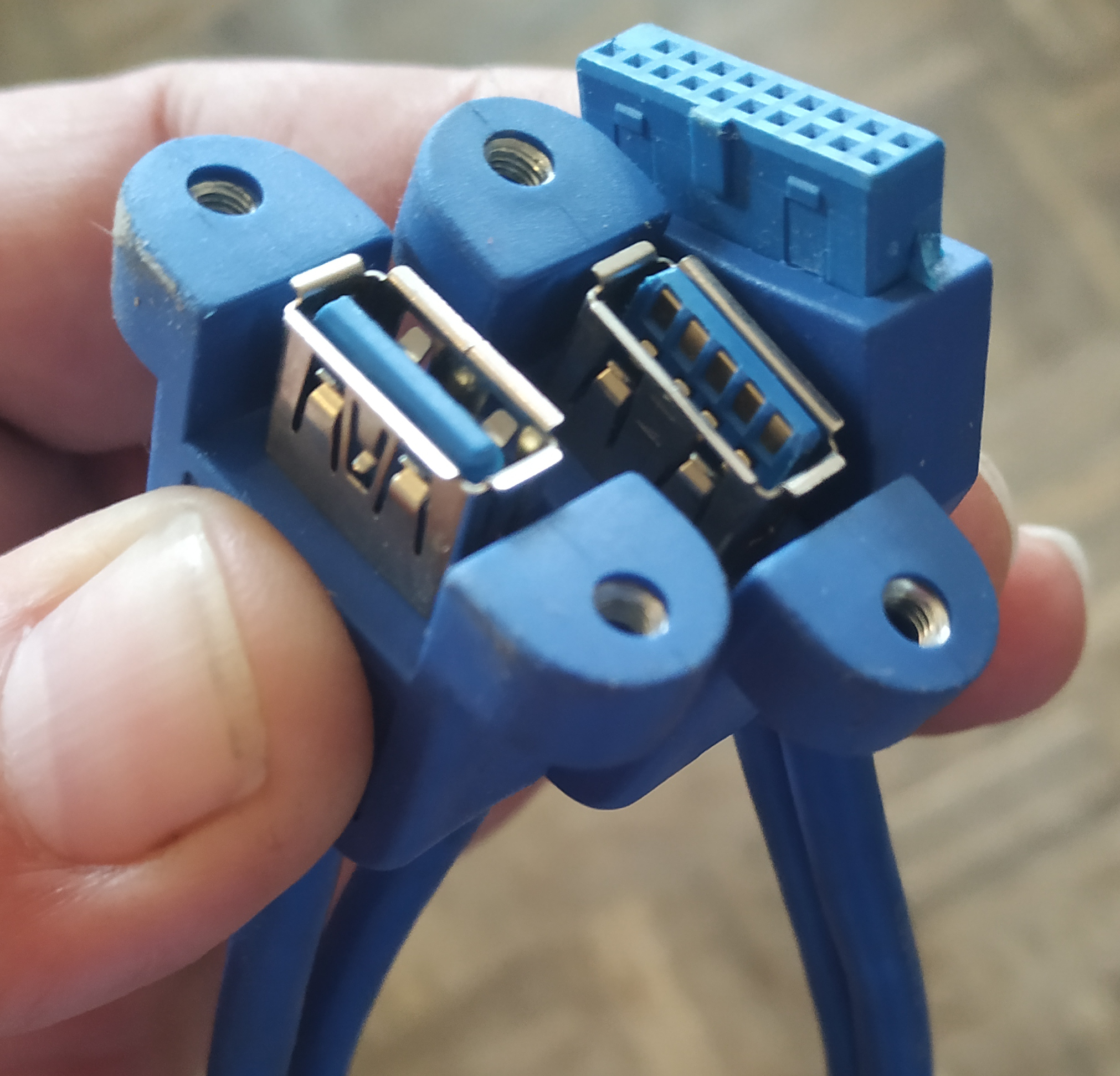
And they are available in other configurations like brackets.
Installing Linux
Installing Xubuntu 20.10
This turned out to be NOT working, but for reference it is documented...
Where is "Startup Disk Creator" when you need one? Gone to oblivion? No, see next heading. So another approach after downloading Xubuntu... 20.10!
Put a USB stick in and ctrl-alt-t in order to find it...
sudo fdisk -l ... Disk /dev/sdx: 7,25 GiB, 7776239616 bytes, 15187968 sectors Disk model: DataTraveler G3 ...
Next, if you don'd have ddrescue, do apt install gddrescue on Ubuntu. Started in the directory where the iso lives and creating it on stick /dev/sdx - see output fdisk for your stick.
sudo ddrescue xubuntu-20.10-desktop-amd64.iso /dev/sdx --force -D ...
After finishing, you're ready for the next step.
Well, not quite! Xubuntu 20.10 was a bad experience. Several attempts left the system with a kernel panic. Bummer! Sayonara Xubuntu 20.10!
Question: Is this smart? I.e. using ddrescue? synaptec searching for usb-creator is an option... More on that, if you have an opinion, please leave a comment. See https://help.ubuntu.com/community/Installation/FromUSBStick.
Installing Xubuntu 20.04
In the mean time, I found "Startup Disk Creator". Turns out to be an alias, so if you can't find it: apt install usb-creator-gtk first. A boot stick with an ISO of Xubuntu was a piece of cake, boot with the stick, press F11 after the keyboard LED flashes, more cake.
Partitioning
Not being used to UEFI, that still is a bit strange. What I did and in this order:
- GPT partition table
- ESP (EFI System Partition): 0.2% ~ 2 000 MB. Is less a penny wise and a pound foolish?
- EXT4 for /: 800 000 MB
- SWAP: 32 000 MB
- Not partitioned for emergency OS and so on: ~ 150 000 MB
No sound!
No sound, there is always something... pacmd list-cards offers an overview of all "cards" and both HDMI and onboard card resulted in: active profile: <off>. Bad news. Probably not necessary, but I plugged in some headphones, did sudo apt-get remove --purge pulseaudio and then sudo apt-get install pulseaudio, rebooted and I had the onboard audio working. Strange!
Solving mouse and keyboard semi frozen state
Mouse and keyboard work while you are busy. Then you grep a cup of coffee and find out the mouse pointer moves, but no click events from either mouse or keyboard arive. However you can do Ctrl-Alt-F1 and do your thing. Turning back with Ctrl-Alt-F7 and the problem is back. Pretty frustrating!
Finally, I removed the screensaver, when I leave my work space I turn off my monitor (and the lights).
Solutions are described on Askubuntu (if you need a screensaver go there) and the Xubuntu maillinglist. These are the steps I took:
sudo apt remove xfce4-screensaver
Next, disable start on login of xfce4-screensaver: In Xubuntu it is:
Whisker > Settings > Session and Startup > [] Screensaver (launch screensaver and locker program)
Then, Whisker > Settings > Power Manager > Tab Display > Display power management > ON (Yes, not OFF!) > move sliders to "Never".
Finally:
xfce4-screensaver-command --exit
All kind of other installing stuff
I've written step by step instructions here, you may want to start at page 1:
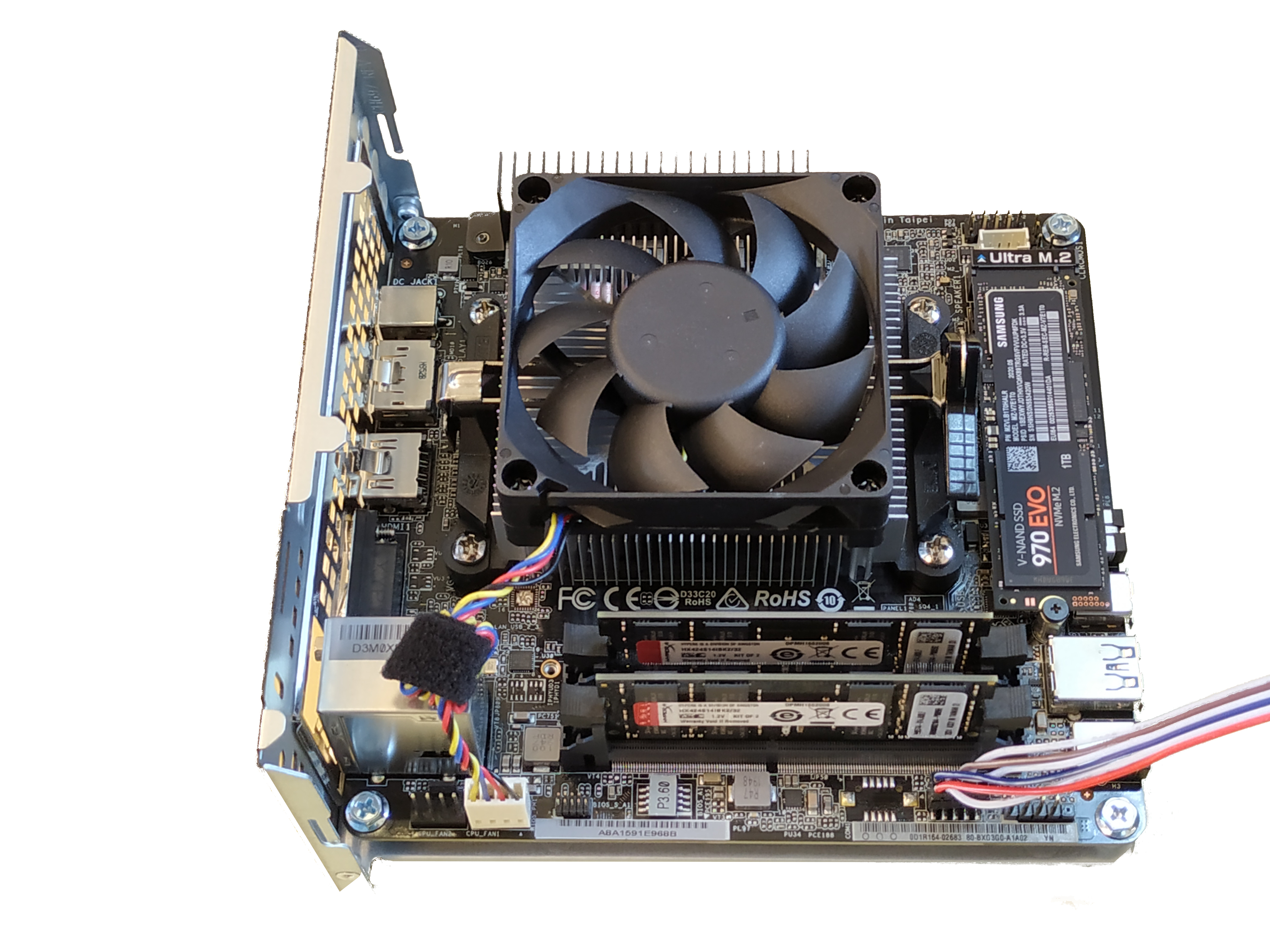
AMD fan interferes with HyperX modules
Although not much, the fan housing hit the RAM module. In order to maintain proper contact of RAM in the slot, I removed some plastic from the fan housing. On top of that, I did not want it to start resonating.
The solution is easy, see the picture:
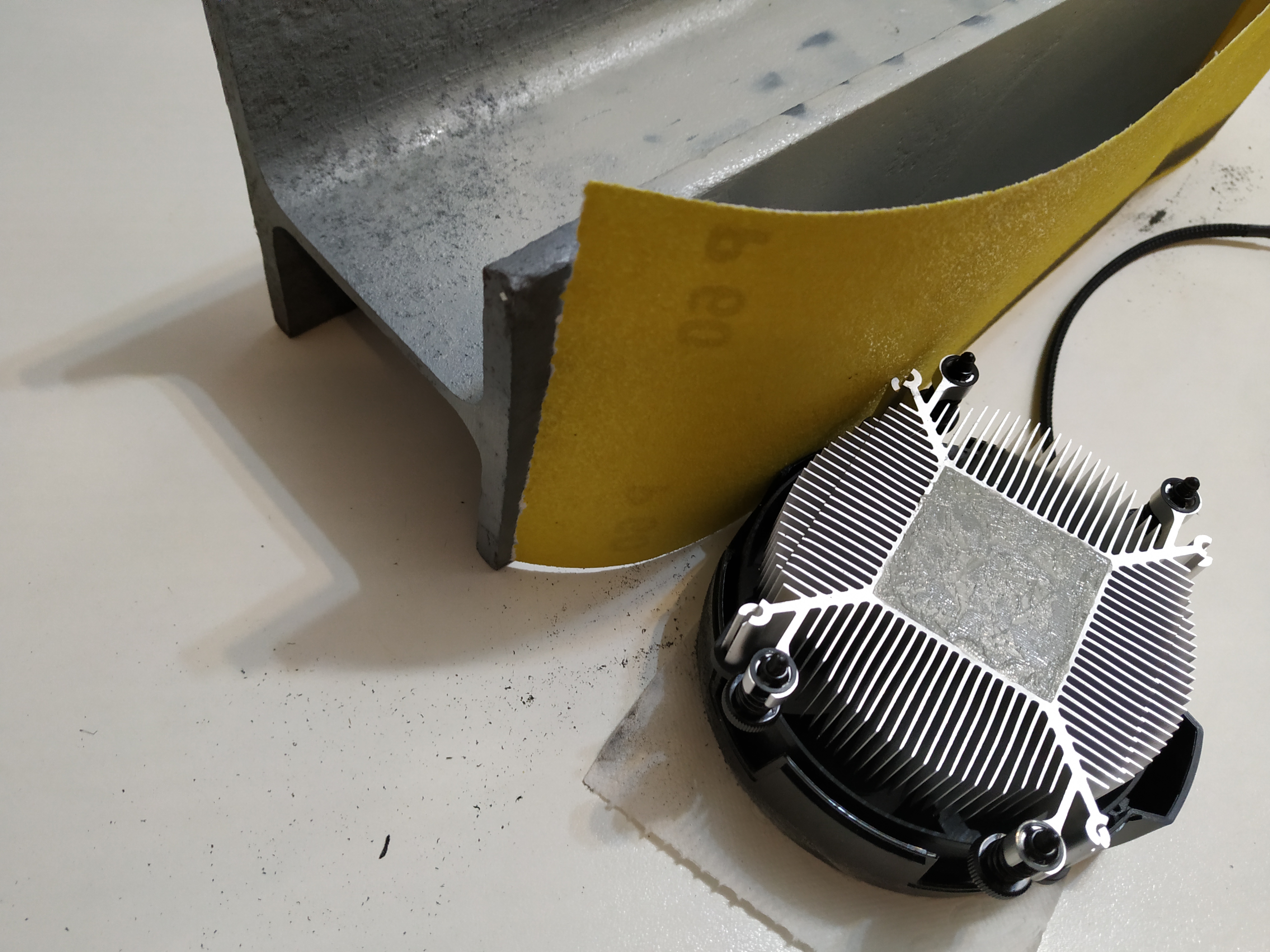
In addition, cleaning the aluminium with isopropanol and adding new thermal paste is necessary.
BIOS assigns inferior speed to Kingston RAM
The HyperX Kinston modules are 3600 MHz and the BIOS recognized them as 2400 MHz - or so it seems. I've changed that manually in the BIOS: B550M-ITX/ac P1.00.
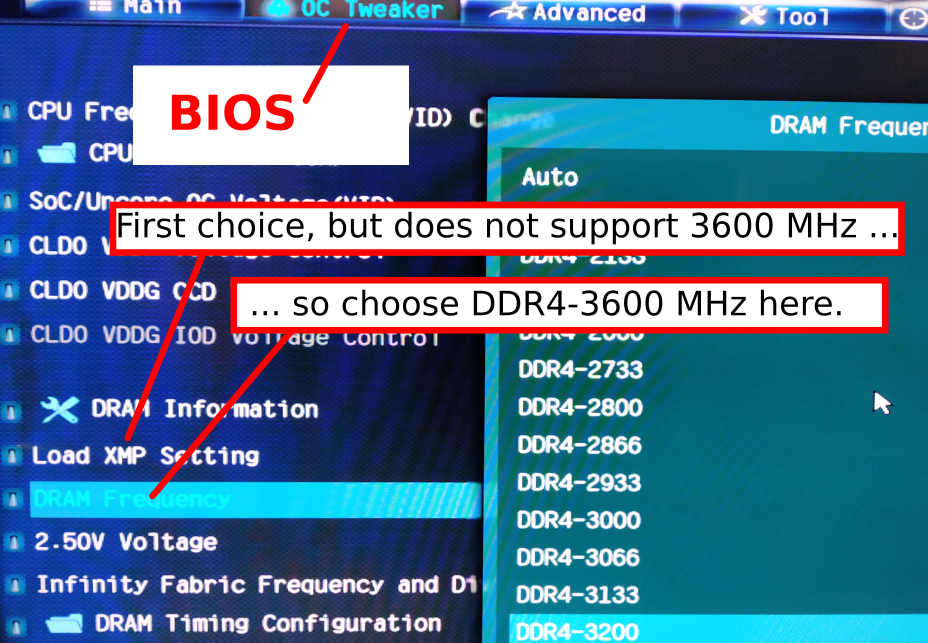
So it turns out to be 2400 MHz RAM, verified for overclocking to 3600 MHz by Kingston. See comments, I can live with that, no issues after several months of stability. However, really confusing and annoying!!
WD Gold drive
With so many drives out there, it is hard to choose. As explained, this drive is used for running rsnapshot. The previous drive did its job for a relative short time but simply became to small. So it was time to go from 8 TB to 16 TB. We have quite a few WD Gold drives in the field and so far, no problems at all. This is the product sheet.
However, I was asking myself if it might be reasonable to just do the daily back-up and than power down in between. Well, people running servers will always advice against this - never stop a running disk drive. To a certain extent I agree, experience shows drives running for a decade and refusing duty after one stop and start. But modern drives? So I asked WD support.
You shouldn't be worried, especially on such low usage case scenario. Of course, we cannot know for sure as there might be many factors that influence the life spam of a drive, read and write cycles, correct power supply, environment etc.. but if everything is under normal conditions, WD Gold drives are designed for a lot of usage.
So it seems save to say a once a day on and off cycle wouldn't harm.
But then again, why take the trouble? Rule of thumb: Every 1 Watt costs 2€ per year. So 5 years 5 W is 50€. Hardly an argument considering the price of the disk is a tenfold.
Some additional notes: The drive is fast indeed, from NVM to SDA I clocked speeds exceeding 200 MB/s by far. On top of that, it is not a noisy drive.
Status
A working solution... but homeless!
More later!