
AMD 9700X and DeskMini X600
THIS PAGE IS UNDER CONSTRUCTION
In four years, barriers have really been broken in terms of speed. Single Thread Performance towards double and Total Performance well above double. And all that in a tiny little box that fits easily into my rucksack. Say Goliath in the bottle, say PharlapIII. That happened in the range of 65W TDP CPU's, the AMD Ryzen 4650G was a revolution and then there is 9700X, crushing records in that TDP class. Very impressive!

Ryzen from the dead
About updating the BIOS in order to get it running, it was a nightmare with a happy ending. For additional tips, see comments.
ASRock's page on BIOS updating lists actually two ways to update the BIOS in order to use the new generation Ryzen CPU's. It is easy to overlook the second alternative named "FlashBack". On YouTube, ASRock explains the procedure. I'm going to summarise:
- BIOS files can be found here:
- Download the latest BIOS file from "global" under heading "BIOS"
- This is a ZIP file, unpack in order to get the .ROM file
- Rename the .ROM file to "PSPBIOS.IMG"
- Download the file under "BIOSUBU", from "global" and make sure you pick the right one, AMD 9700X is "Granite Ridge".
- This is a ZIP file too, unpack in order to get the .BIN file
- Download the latest BIOS file from "global" under heading "BIOS"
- Prepare a USB device in a MS Windows environment, stick:
- 32 GB or bigger (For me 8 GB worked well)
- Formatted FAT32, 16 kB allocation unit size (why?), and empty
- Copy the files BIOSUBU.BIN and PSPBIOS.IMG to the USB device
- Prepare boot:
- Unplug, count to 10 and plug-in the power.
- Insert the USB device into the corresponding port, front port (back port did the job for me)
- To start BIOS Flashback: Press the power button for about 3 seconds until the blue LED near the button starts blinking, release your finger immediately. Ventilator should be running too now.
- When the light stops flashing, the update is complete
What exactly went wrong, I don't know but I had to flash the BIOS eight times, with four different USB flash drives, clearing the BIOS again and again, switching USB ports. Different power supplies and even taking everything apart again, checking the pins of the CPU, the contacts of the DDR5 modules, switching NVME. I had almost given up and then, suddenly, I saw a hard disk LED flickering. The BIOS update had succeeded after all. Why was it so difficult? I have no idea.
Stability is an issue
Although I use the system daily, I still encounter random green screens of death. Uptime varies: sometimes two weeks, sometimes one hour. This could be an incidental hardware defect - Asrock generally delivers solid products - but the root cause remains unclear. The motherboard is the main suspect, yet even after extensive testing I cannot fully rule out the RAM. That makes it a difficult problem, especially because the machine is in production use.
There is no pattern. Heavy load is stable; a silent idle can suddenly trigger a green screen. On top of that, the system sometimes needs more than five power cycles before it will boot again - unusual behaviour that points to deeper initialization issues.
Is it a reason not to buy it? Hard to say. I have built many DeskMinis and other Asrock-based systems for third parties without any issues of this kind. This one is simply different. Replacing the unit now seems the only realistic option, and that is a costly step. The Franken-NIC has been removed and was not the cause - the only good news.
Specs:
Initial configuration:
- ASRock DeskMini X600
- AMD Ryzen 7 9700X
- Noctua NH-L9a-AM5
- 96 GB RAM: Kingston Technology KVR56S46BD8-48 SODIMM DDR5-5600 (2x)
- 2 * 4TB System + Storage: WD Black SN850X 4TB NVMe M.2 80mm PCIe G4 (1x)
- 1 * 8TB Rsnapshot: SSD Samsung EVO 870
- FrankenNIC
Power usage
This published power consumption of the configuration is somewhat higher than a Deskmini X300 with an AMD 4650G Pro.
The configuration is very responsive. This creates high spikes in power consumption that you don't see in the table. It feels somewhat nervous and at the same time festive, like a ride in a BMW M2.
Fan noise: The Noctua is a must to suppress noise. However, it spins up often and is very responsive to power spikes. You may want to tune it in the BIOS, accepting higher CPU temperatures. It is not annoying but yes, I hear the the fan from time to time.
Processes like FFmpeg and Blender are run extremely fast but in doing so, consumption also often goes well over 100 Watts, well over the 65 Watt thermal design power TDP is what I suspect.
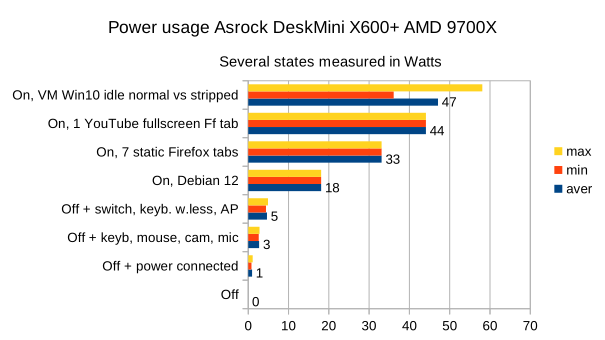
Following are some comments on the interpretation of the table.
- All table values do not include peak values. High and low values were measured over a period of approximately 1 minute.
- "Idle on with Debian" is a clocked value over 40 samples some time after startup. There are quite a few USB devices connected so it is safe to say that the consumption idle with just a wired keyboard and mouse is around 13 watts. Considering the number of cores, that's not a bad result.
- Using Windows in a virtual machine (VirtualBox) is immediately a hefty extra burden because it consumes more than Linux and also starts all kinds of processes that run for long periods of time, such as indexing, telemetry data harvesting and anti-virus actions.
- Normally it is not really interesting but when I work off grid and a virtual machine is not needed for a while, I close it, pause it, with RightCtrl-p.
- Virtual machines, especially Windows, are irritating power guzzlers.
History
If you are interested...
Pharlap I 2020
For our work, a fast CPU and lots of memory is never a luxury. Virtual machines take up RAM, some processes claim all computing power for long times and for CAD, STP, Single Thread Performance is especially important.
So in 2020, Pharlap emerged with an AMD Ryzen 5 Pro 4650G with some fat hard drives for data and backup.
Pharlap II 2023
After a data reorganisation and availability of larger SSDs and NVME modules, in 2023 it proved feasible to build a server workstation based on a DeskMini X300. We had previously deployed DeskMini's with great success so this was a logical thought. With that, Pharlap's MLM, Mid Life Modernisation, became a reality. Keywords are Linux, systemd networkd, NFS, Rsnapshot (8TB SSD for 4TB NVME), FrankenNIC (WIFI M.2 > M.2 A+E to Mini PCIe > NIC). Being able to work completely off grid, anywhere, is very important to us. And there are no worries about theft, the Deskmini simply disappears into a mini backpack when we are on the road.
As I write this, it is 2024. Do you immediately write off a 1-year-old computer? No, of course not. After transplanting components to pharlap3, a very nice system remains. That becomes the basis of a security server described here.
Pharlap III 2024
The DeskMini X600, combined with AMD 9700X and lots of RAM is a huge leap forward, both in terms of speed and possibilities. Cutting edge technology is nice but then there are bumps to be solved, so be it. But the comparison between 2020 and 2024, more or less doubling speed remains remarkable.
An interesting step is changing from Ubuntu to Debian. Saying good bye to Xubuntu breaks my heart a bit but Debian has evolved into easier, more user friendly while remaining more pure and being the source of many distro's. So far I am happy and "snaps" are history.
The current setup appears to be working extremely well. Some keywords:
- Networkd, systemd, tight definitions
- NFS, data access only for some identified computers
- LUKS, really everything encrypted, I sleep so much better these days!
- Rsnapshot internal backup plus some rotating off-line 3.5’ disks plus Rsync to an NFS client.